From your dropdown menu on the top right, select Tokens / Earnings, or from your Settings page, scroll to the Model Actions section and select Tokens / Earnings.
On this page will be displayed the following:
- Your VIP status & bonus tracker
- Track clicks towards access to VIP earnings and bonuses. "Link us in bio and drive 100+ clicks in 7 days." View your VIP tracker page.
- CamSoda's daily, weekly, and monthly contests and standings
- CamSoda holds contests for models to win bonuses daily and weekly based upon token earnings. If you win a contest, the earnings will appear in your Bonus Log
- Current Pay Period statistics
- Pay periods last Monday through Sunday and are typically paid out the following Thursday so long as you've met your minimum payout amount. If the payout amount is not met, your payment will be held until the amount has been reached.
- Pay Period stats include the amount of broadcast tokens earned, tokens earned from media sales, your total tokens earned, the amount of time in minutes/hours you've broadcast, and any contest bonuses.
- Your Broadcast Log for corresponding pay periods
- The log contains data for multiple pay periods. The data includes how many minutes you broadcast on a given day, tokens from media sales and broadcasts, your total tokens, your average tokens per hour received, and the payout amount from the associated pay period.
- User Stats for 90 days, the year, and all-time
- User stats include your total tokens earned, broken down into categories: other, ShareCam, adjustments, Snapchat sales, media sales, tokens earned from private shows, tokens sent via private message, offline tips received, and normal tips received during broadcasts.
- Your Bonus Log
- Here, you will be able to see a list of bonuses received.
- Your Payout History
- You may look up your payout history for specific pay periods, and the full history is downloadable by clicking on the text that says Download. The information includes the date of the pay period, the amount paid, and the date paid out.
Want to see how many tokens you've earned this pay period without the details? View them near the top right corner of your page. Tapping on Tokens will take you directly to the Tokens / Earnings page.
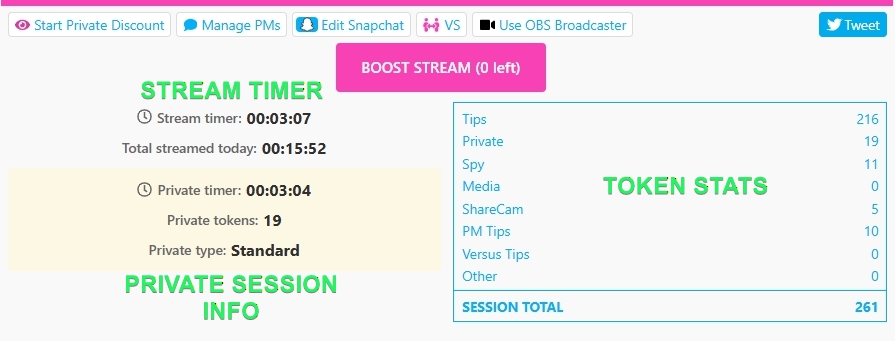
You can also see your earning statistics right in your stream room:
- Locate the table underneath your stream window. Here, you'll see information related to tips you've received that day.