Can I sell custom media?
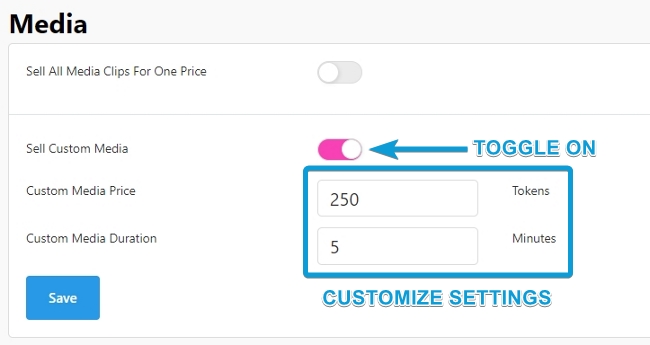
CamSoda allows models to sell custom media, catering to specific fan requests. To enable:
- Go to the Settings & Privacy page
- Locate the Media settings
- Toggle on Sell Custom Media
- Set a price and duration
- Tap Save to apply the changes, and users will be able to place orders from your profile page!
How do I complete a custom media order?
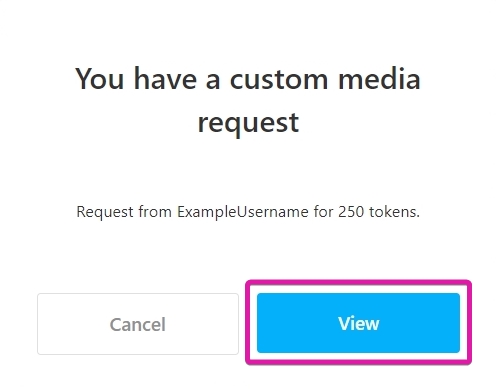
- When a custom order is placed, you'll get a notification and can view the request in the Pending Item section.
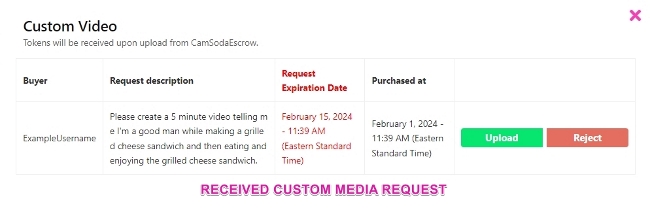
- You will have 14 days to upload your custom media piece from the date the request was sent.
- If the media is not delivered within the time frame, the tokens will be returned to the requester.
- After creating the media, upload it using the green Upload button.
- You can see the progress on the green button as it displays a number percentage (%).
- When the upload completes, the media will be reviewed for compliance and delivered to the user's media collection. You will be notified of any content issues.
- If you encounter technical problems sending your media, you may contact Model Support for further assistance.
Remember, you are not obligated to create media for a request with which you are uncomfortable and are welcome to reject such requests.